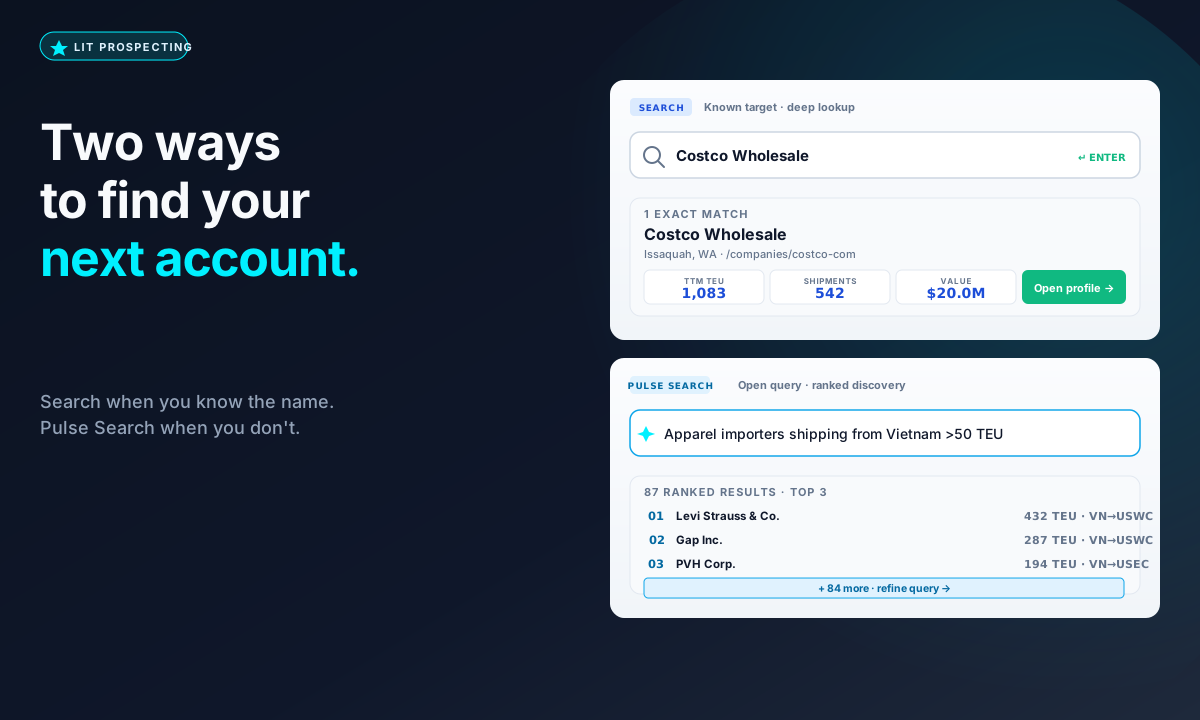
Most sales motions inside LIT start the same way: an AE wants a list of accounts that look like a fit. The thing that determines which surface to use is whether they already have a name in mind.
Use Search when you know the company
Demo on your top 3 lanes — we'll show you the saved-company workflow against your actual book of business.
Search is the deep-lookup surface. Type the company name. Get the full profile back: trailing 12-month TEU, shipment count, top lanes, dominant carriers, HS-code mix, top suppliers, and 5–30 verified buyer-side contacts. This is the right tool when you've got a list of named targets — your top 50 accounts, a prospect a rep is walking into tomorrow, a customer-success review you're running before a QBR.
Search is precise because the query is precise. You're not asking the system to guess what you mean. You're saying 'tell me everything about Acme Inc.' and the system returns the operator-grade dossier we built from US Customs filings. Nothing is inferred. Nothing is hallucinated.
Use Pulse Search when you don't
Pulse Search is the open-ended surface. You describe what you want to find. Pulse parses, queries the trade graph, and ranks the matches. The output is a list of accounts you've never heard of — sized by relevance, scored by recency, ready to import into a sequence.
The queries that work are the ones you'd ask a junior analyst. 'Importers shipping electric vehicle components from Korea to the West Coast.' 'Mid-market apparel brands sourcing from Bangladesh with quarterly volume over 50 TEU.' 'Houston-based industrial importers who added a Mexico-sourced lane in the last six months.' Each one becomes a ranked list, not a guess.
Why the two-surface design matters
Forcing a known-target lookup through a discovery interface wastes seconds you don't have. Forcing an open-ended discovery through a name-only search wastes the entire workflow. The two surfaces sit on the same data — same BOL graph, same contact graph, same recency thresholds — and they hand off cleanly. Use Pulse to find a list, then click any row to drop into Search for the deep profile. Or start with a known account and use Coach to pivot into 'who else looks like this account' via Pulse.
The fastest way to internalize the split is to do one of each in a single sitting. Look up two named accounts. Run two Pulse queries that describe accounts you'd like to find. Watch what comes back. The right tool is the one that matches what you actually have in mind — and the answer changes with every step of the funnel.